Contributing Help Content
This guide shows you how to add in-app help content to any New Relic One (NR1) project. The Help Experience consists of three main components that work together to deliver contextual assistance.
System Architecture
The Help Experience is built on three components:
- Entry point component: Shared UI component (the ? icon) that users click to open help
- Renderer nerdlet: Displays help content in the focus panel
- Content service: Stores all help articles as MDX files
Adding Help to Your Project
Step 1: Install the Shared Component
Add the in-app help component to your project dependencies:
npm install @datanerd/shared-component-in-app-help
Or add it directly to your package.json:
"dependencies": {
  "@datanerd/shared-component-in-app-help": "1.1.2"
}
Step 2: Import and Use the Component
Import the component and add it to your UI:
import InAppHelpToolTip from "@datanerd/shared-component-in-app-help";

<InAppHelpTooltip id="vm.vulnerabilityPrioritization" />;
The id prop references a specific content file in the in-app help service. When users click the help icon, the associated content displays in the help panel.
Content Types
The help renderer supports two content types:
Summaries
Summaries provide broad overviews of a capability or location in New Relic One. They can only be associated with a single location.
Pages
Pages deliver specific help content and can be accessed through:
- Help entry points in the UI
- Tiles on summary pages
- Direct links from other help content
Pages support multiple locations and optional video content.
Finding Location IDs
To associate help content with the correct UI location, use the Navigation Information feature:
- Ensure your user ID is added to the feature flag
- Navigate to the relevant page in New Relic One
- Open the Help panel
- Click the Navigation Information button at the bottom
- Copy the suggested location ID displayed
The suggested location ID aggregates navigation state from the useNavigationState platform hook into a single string, enabling precise content placement anywhere in the UI.
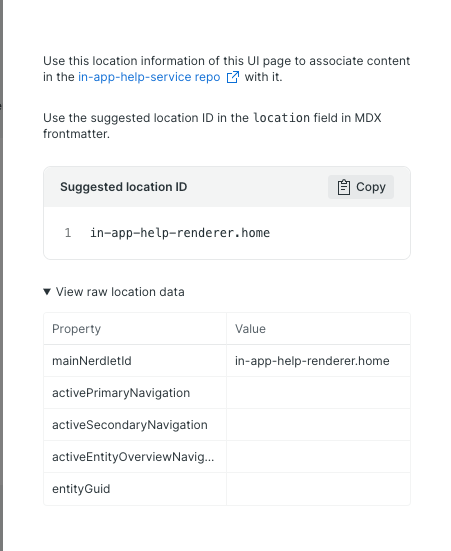
Creating Help Content
All help content lives in the in-app-help-service repository under the content directory. Content files use MDX format, which combines markdown syntax with React component capabilities.
Summary File Structure
Summaries require four frontmatter fields:
---
id: apm.overview # Format: capability.summary-title
title: APM Overview # Displayed at top of summary page
location: [nr1-core.home/APM] # Suggested ID from Navigation Information
---
Content paragraph describing the capability at this location.
Page File Structure
Pages use the same four required fields, plus optional multi-location and video support:
---
id: apm.overview # Format: capability.page-title
title: Application Performance # Displayed at top of page
location: # One or more suggested IDs
  - apm.overview/APM/apm.overview
  - apm.overview/MOBILE/apm.overview
video: # Optional
  host: YOUTUBE # Video hosting platform
  id: abc123xyz # Video identifier
---
Content paragraph explaining the concept or providing instructions.
Important
All help content must be reviewed by the Tech Docs Team or UI Writing Team before publishing. Contact the current hero in #help-documentation for review assistance.
Local Development Workflow
Test your help content changes locally before deploying:
- Run both
in-app-help-rendererandin-app-help-serviceprojects locally - Make your content changes in the
in-app-help-servicerepository - Navigate to:
https://dev-one.newrelic.com/in-app-help-renderer/preview?nerdpacks=local - Enter the content ID in the appropriate field (help page or summary page)
- Click Preview to view your changes
This workflow allows you to iterate quickly and verify content renders correctly before submitting for review.