PHP Agent Attributes
Agent attributes are key-value pairs containing information that determines the properties of an event or transaction. New Relic enables users to customize exactly which attributes will be sent to each of these destinations:
- Transaction traces in New Relic APM
- Error traces in New Relic APM
- Transaction events in Insights
- Page views in Insights
This document provides specifics for attributes available as of PHP agent version 4.9.
Attribute Destination Flow
The following diagram illustrates how the agent decides to send attributes to each destination:
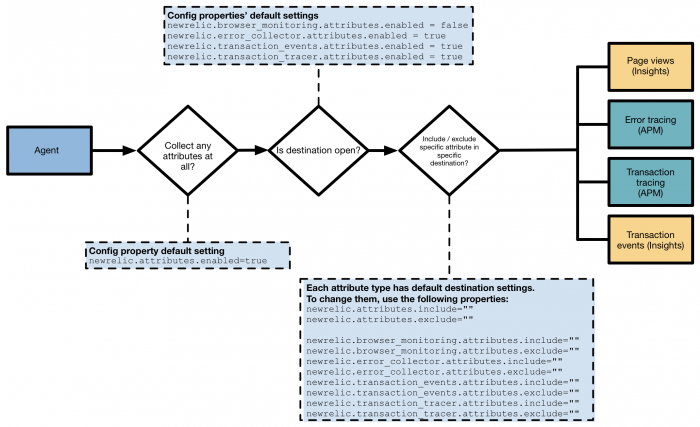
Agent attribute collection: The agent makes three different decisions when sending an attribute to any New Relic destination based on the relevant property settings.
PHP Agent Attributes
You can configure the following attributes in the PHP agent. See PHP agent (newrelic.ini) settings and Enabling and disabling attributes for more information.
httpResponseCode
The response status code for a web request.
Defaults:
- Transaction traces: Enabled
- Error collector (traced errors): Enabled
- Transaction events: Enabled
- Page views (browser monitoring): Unavailable
// Example: Captured automatically
// HTTP 200 OK response
http_response_code(200);

// HTTP 404 Not Found h
http_response_code(404);
newrelic_add_custom_parameter API call
Attributes added to a newrelic_add_custom_parameter() call on the New Relic API.
Defaults:
- Transaction traces: Enabled
- Error collector (traced errors): Enabled
- Transaction events: Enabled
- Page views (browser monitoring): Enabled
  // Add custom parameters to your transaction
  newrelic_add_custom_parameter("user_id", $userId);
  newrelic_add_custom_parameter("product_id", $productId);
  newrelic_add_custom_parameter("cart_value", $cartTotal);
request.headers.referer
The optional request header referrer.
Defaults:
- Transaction traces: Disabled
- Error collector (traced errors): Enabled
- Transaction events: Disabled
- Page views (browser monitoring): Disabled
  // Captured automatically from HTTP headers // Example header: Referer:
  https://example.com/previous-page
request.parameters.*
Request parameters from the transaction.
The capture_params property has been deprecated. However, if set to true,
it will enable request parameters for transaction traces and traced errors.
Defaults:
- Transaction traces: Disabled
- Error collector (traced errors): Disabled
- Transaction events: Disabled
- Page views (browser monitoring): Unavailable
// To enable request parameter capture
// Add to newrelic.ini:
; newrelic.attributes.include = "request.parameters.*"

// Will capture GET/POST parameters like: // $\_GET['search'] = 'products' // $\_POST['username'] = 'user123'
SERVER_NAME
The name of the server host under which the current script is executing.
Defaults:
- Transaction traces: Enabled
- Error collector (traced errors): Enabled
- Transaction events: Disabled
- Page views (browser monitoring): Disabled
  // Captured automatically from $_SERVER superglobal // Example:
  $_SERVER['SERVER_NAME'] = 'www.example.com'
request.headers.User-Agent
The contents of the User-Agent HTTP header.
Defaults:
- Transaction traces: Enabled
- Error collector (traced errors): Enabled
- Transaction events: Disabled
- Page views (browser monitoring): Disabled
  // Captured automatically from HTTP headers // Example: User-Agent:
  Mozilla/5.0 (Windows NT 10.0; Win64; x64) AppleWebKit/537.36
Change Where Attributes Are Sent
All destinations are open to attribute collection by default in the PHP agent, except newrelic.browser_monitoring.attributes.enabled.
To change which attributes are sent to the APM and Insights destinations:
1. Enable or Disable Destinations
Open or close any destination to attribute collection by changing the .enabled destination property:
  ; Enable/disable attributes for specific destinations
  newrelic.transaction_tracer.attributes.enabled = true
  newrelic.error_collector.attributes.enabled = true
  newrelic.transaction_events.attributes.enabled = true
  newrelic.browser_monitoring.attributes.enabled = false
2. Include or Exclude Specific Attributes
Change the default attribute setting by adding the attribute name to the destination's .include or .exclude properties:
; Include specific attributes
newrelic.attributes.include = "request.parameters.username,request.parameters.product_id"

; Exclude sensitive attributes newrelic.attributes.exclude = "request.parameters.password,request.parameters.credit_card"

; Destination-specific includes newrelic.transaction*tracer.attributes.include = "request.headers.*" newrelic.error*collector.attributes.include = "request.parameters.*"

; Destination-specific excludes newrelic.browser_monitoring.attributes.exclude = "request.headers.cookie"
Important
See Attribute rules for which settings supersede each other. The most specific rule takes precedence.
Attribute Rules and Precedence
When configuring attributes, the following precedence rules apply:
- Most specific wins: Destination-specific settings override global settings
- Exclude wins over include: If an attribute is in both include and exclude lists, it will be excluded
- Explicit wins over wildcard: Specific attribute names override wildcard patterns
; Global settings (lowest precedence)
newrelic.attributes.include = "request.*"
newrelic.attributes.exclude = "request.headers.*"

; Destination-specific (higher precedence) newrelic.transaction_tracer.attributes.include = "request.headers.referer" ; This will include referer for transaction traces despite global exclude

; Most specific (highest precedence) newrelic.transaction_tracer.attributes.exclude = "request.headers.cookie" ; This will exclude cookie even if included by wildcard
Upgrading the PHP Agent
When upgrading to PHP agent 4.9 or higher, upgrade your configuration file. For more information about deprecated properties, see Enabling and disabling attributes.
Migration Guide
Old configuration:
; Deprecated newrelic.capture_params = true
New configuration:
; Current newrelic.attributes.include = "request.parameters.*"
Security Considerations
Caution
Be careful when including request parameters or headers as they may contain sensitive information. Always exclude attributes that contain passwords, credit card numbers, or other sensitive data.
; Security best practices
; Never include sensitive parameters
newrelic.attributes.exclude = "request.parameters.password,request.parameters.ssn,request.parameters.credit_card,request.headers.authorization,request.headers.cookie"

; If you must include parameters, be specific newrelic.attributes.include = "request.parameters.user_id,request.parameters.product_id"
For More Help
Additional documentation resources include:
- Agent attributes - Types, destinations, and limits for attributes used by New Relic agents
- Enabling and disabling attributes - Properties, rules, and backwards compatibility information for PHP agent attributes
- Attribute examples - Scenarios and results of enabling and disabling different PHP agent attributes
- Installation Guide - Return to the main installation guide
- RedHat/CentOS Installation - Platform-specific installation instructions